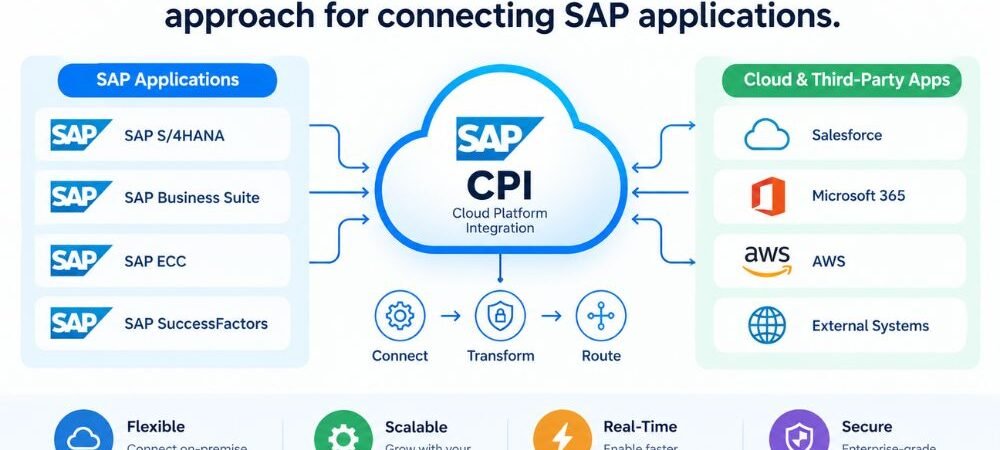
SAP CPI integration is a cloud-based approach for connecting SAP applications, third-party systems, APIs, databases, and business platforms. It allows data to move between different systems through managed integration flows.
Modern businesses often use several applications for finance, sales, human resources, procurement, inventory, customer management, and e-commerce. These systems may use different data formats, APIs, and communication protocols. Without integration, employees may need to move data manually between platforms. This can create delays, duplicate records, and data errors.
SAP CPI, also known as SAP Cloud Integration, provides an integration layer that helps systems exchange information automatically. It is part of SAP Integration Suite on the SAP Business Technology Platform (SAP BTP).
What Is SAP CPI Integration?
SAP CPI integration connects two or more applications and controls how data moves between them. A typical integration starts with a source system, sends information to SAP CPI, processes the message, and delivers the result to a target system.
For example, an online store can send a customer order to SAP S/4HANA. SAP CPI can receive the order, transform its data structure, validate required information, and send the processed message to SAP S/4HANA.
A basic integration architecture looks like this:
Source System → SAP CPI → Processing → Target System
The source and target can be SAP or non-SAP applications.
Common source and target systems include:
SAP S/4HANA, SAP SuccessFactors, SAP Ariba, Salesforce, e-commerce platforms, databases, REST APIs, SOAP services, and SFTP servers.
How Does SAP CPI Integration Work?
SAP CPI integration works through integration flows, commonly called iFlows. An iFlow defines the steps required to receive, process, transform, and deliver a business message.
The process usually contains several technical stages.
First, the source system sends a message to an SAP CPI endpoint. The message can use technologies such as REST, SOAP, OData, IDoc, HTTP, or SFTP.
SAP CPI receives the message through the configured adapter. The integration flow then processes the message according to its configured logic.
The message can be filtered, validated, transformed, mapped, or routed to different destinations. After processing, SAP CPI sends the final message to the target system.
For example:
E-commerce platform → REST API → SAP CPI → Data Mapping → SAP S/4HANA
This architecture allows the source and target systems to communicate without requiring a direct connection between them.
What Is an iFlow in SAP CPI?
An iFlow is an integration flow that defines how a message moves between connected systems.
An iFlow can contain multiple processing steps. These steps may include sender and receiver adapters, message mapping, content modifiers, routers, filters, scripts, transformations, and exception handling.
For example, an order integration may use the following process:
Receive Order → Validate Data → Map Fields → Check Order Type → Send to SAP S/4HANA
Each step performs a specific function within the integration process.
iFlows can be developed, tested, deployed, and monitored through the SAP Cloud Integration environment.
SAP CPI Data Transformation
Different applications often use different data structures. One system may use JSON while another requires XML. Field names and data formats can also differ.
SAP CPI supports data transformation so that information can be processed according to the requirements of the receiving system.
For example, an e-commerce application may send:
customer_id
while the target SAP application may expect:
CustomerNumber
A message mapping can connect these fields during integration.
Data transformation can also involve changes between XML and JSON structures, filtering fields, restructuring messages, and applying required business logic.
SAP CPI Integration With SAP S/4HANA
SAP S/4HANA is one of the major SAP systems used in enterprise integration scenarios.
SAP CPI can connect S/4HANA with external applications and other SAP services. These connections can support business data such as customers, products, sales orders, invoices, suppliers, purchase orders, and inventory.
For example, a retail company can connect its online store with SAP S/4HANA. When a customer places an order, the integration can transfer the order information to SAP S/4HANA for further processing.
The integration can also transfer information in the opposite direction. Inventory information from SAP S/4HANA can be delivered to an e-commerce platform so customers can see available stock.
SAP CPI API Integration
APIs provide structured methods for applications to exchange data. SAP CPI supports API-based integration scenarios using technologies such as REST and SOAP.
A REST API commonly exchanges data using JSON or other structured formats. SOAP services commonly use XML-based messages.
SAP CPI can receive an API request, process its information, apply transformation rules, and send the required data to another system.
For example:
CRM API → SAP CPI → Customer Data Transformation → SAP S/4HANA
This approach can connect cloud applications without creating separate custom integration logic inside every application.
SAP CPI Adapters
Adapters provide communication between SAP CPI and external systems. The adapter selected for an integration depends on the technology and protocol used by the connected application.
Common adapter types include HTTP, HTTPS, REST, SOAP, OData, SFTP, IDoc, and JDBC-related connectivity.
For example, an application that provides a REST API may use a REST or HTTP-based connection. A file-based integration may use SFTP.
Selecting the correct adapter is an important part of integration design because it determines how SAP CPI communicates with the source or target system.
SAP CPI Message Mapping
Message mapping converts information from a source structure into the structure required by a target system.
Consider a customer record containing:
firstName
lastName
The target application may require:
First_Name
Last_Name
Email_Address
SAP CPI can map the source fields to the required target fields.
Mappings can also include transformations and functions where the target system requires a different value or format.
SAP CPI Routing
Routing allows an integration flow to send messages to different destinations based on defined conditions.
For example, an organization may process orders differently depending on the country where the customer is located.
A router could direct one type of message to an SAP S/4HANA system and another message to a third-party logistics platform.
Routing is useful when a single integration process needs to support multiple business conditions or destinations.
SAP CPI Security
Security is a major part of enterprise integration. SAP CPI supports secure communication and authentication mechanisms for connecting applications.
Depending on the integration scenario, authentication can involve certificates, OAuth, basic authentication, and other supported methods.
Secure protocols such as HTTPS and SFTP can protect data during transmission.
Integration security also involves credential management, certificates, authorization, endpoint protection, and access control.
Sensitive business information should only be transferred through properly secured connections and authorized systems.
SAP CPI Error Handling
Integration errors can occur for several reasons. A target system may be unavailable. A message may contain invalid information. Authentication may fail. A mapping may contain an incorrect field relationship.
SAP CPI provides capabilities for handling these situations.
Exception subprocesses and other error-handling mechanisms can be configured within integration flows. These mechanisms can help identify failed messages and provide information for troubleshooting.
For example, if a required customer number is missing from an order message, the integration flow can identify the problem instead of sending incomplete information to the target system.
SAP CPI Monitoring
Monitoring helps integration teams track the status of message processing.
SAP CPI provides monitoring capabilities for integration flows and processed messages. Teams can investigate successful and failed message executions and examine available processing information.
Monitoring is important for business processes where integration failures can affect orders, invoices, customer records, employee information, or inventory.
A monitoring process can help teams identify problems such as authentication errors, endpoint failures, invalid payloads, mapping issues, and unavailable target systems.
Why SAP CPI Integration Matters
SAP CPI integration matters because modern businesses often operate multiple applications that need to exchange information.
Without integration, data may remain isolated within individual systems. Employees may need to enter the same information into more than one application.
An integrated environment can automate data exchange between systems.
For example, an order can move from an e-commerce platform to SAP S/4HANA without manual data entry. Customer information can move between CRM and ERP systems. Employee information can be exchanged between HR and other business applications.
This can create a more connected business environment and reduce the need for repetitive manual data transfer.
SAP CPI for Cloud and Hybrid Integration
Many organizations operate a combination of cloud and on-premises systems.
For example, a company may use SAP S/4HANA on-premises while also using cloud applications such as Salesforce, SAP SuccessFactors, or an e-commerce platform.
SAP CPI can support integration across these environments.
This makes SAP CPI relevant for hybrid architectures where applications are hosted in different environments and still need to exchange business information.
SAP CPI Integration Use Cases
SAP CPI can support many business integration scenarios.
A retailer can connect its e-commerce platform with SAP S/4HANA for order and inventory processing. A company can connect SAP SuccessFactors with other HR systems for employee data exchange. A manufacturer can integrate SAP systems with logistics and warehouse applications.
Other common scenarios include customer data synchronization, product information exchange, purchase order processing, invoice integration, supplier integration, inventory synchronization, API integration, and file-based data exchange.
The required architecture depends on the systems involved, data structure, transaction volume, security requirements, and communication protocols.
SAP CPI vs Point-to-Point Integration
Point-to-point integration creates direct connections between applications.
For a small environment with only a few systems, direct connections may be manageable. As the number of applications increases, the integration architecture can become more complex.
For example, several applications may each require separate connections with an ERP system, CRM platform, database, and e-commerce application.
SAP CPI provides a centralized integration layer that can manage communication, transformation, routing, and monitoring.
This can help organizations manage integration processes in a more structured architecture.
SAP CPI and SAP Integration Suite
SAP CPI is commonly used to refer to SAP Cloud Integration, which is part of SAP Integration Suite.
SAP Integration Suite is a broader collection of integration capabilities available on SAP BTP. Cloud Integration focuses on application and process integration through integration flows.
SAP Integration Suite also includes capabilities related to API management, event-driven integration, integration assessment, and other integration requirements.
Therefore, SAP CPI should be understood as a major Cloud Integration capability within the larger SAP Integration Suite platform.
How to Plan an SAP CPI Integration Project
A successful integration project starts with a clear understanding of the systems and business process involved.
The first step is to identify the source and target systems. The integration team then needs to determine how those systems communicate and which APIs, adapters, or protocols are available.
Data structures should also be reviewed. This includes identifying required fields, field mappings, data formats, validation rules, and transformation requirements.
Security requirements should be defined before development. Authentication, certificates, credentials, authorization, and secure communication should be considered as part of the integration design.
The integration should then be tested with valid and invalid data. Error handling and monitoring should also be tested before production deployment.
Frequently Asked Questions About SAP CPI Integration
What is SAP CPI integration?
SAP CPI integration is the process of connecting SAP and non-SAP systems through SAP Cloud Integration. It allows applications to exchange data through integration flows, APIs, adapters, transformations, routing, and other integration functions.
How does SAP CPI work?
SAP CPI receives data from a source system, processes the message through an integration flow, transforms or maps the data when required, and sends the processed message to a target system.
What is an iFlow in SAP CPI?
An iFlow is an integration flow that defines the steps used to process and transfer messages between systems. It can contain adapters, mappings, routers, transformations, validation, and error-handling components.
Can SAP CPI connect non-SAP applications?
Yes. SAP CPI can integrate SAP applications with many non-SAP applications, APIs, databases, file systems, and cloud platforms, depending on supported connectivity options.
Does SAP CPI support REST and SOAP?
Yes. SAP CPI supports REST and SOAP-based integration scenarios. These technologies are commonly used for API and web-service communication.
What is SAP CPI used for?
SAP CPI is used for application integration, data synchronization, API integration, business process integration, file-based integration, data transformation, routing, and communication between cloud and on-premises systems.
Is SAP CPI part of SAP Integration Suite?
Yes. SAP Cloud Integration, commonly referred to as SAP CPI, is a capability within SAP Integration Suite on SAP Business Technology Platform.
Conclusion
SAP CPI integration provides a structured way to connect SAP applications, third-party platforms, APIs, databases, and business systems. It manages important integration tasks such as message processing, data transformation, mapping, routing, security, error handling, and monitoring.
Its role becomes important when businesses need multiple applications to exchange accurate information automatically.
With SAP CPI, organizations can build integration flows between systems such as SAP S/4HANA, SAP SuccessFactors, e-commerce platforms, CRM applications, APIs, and other enterprise technologies.
A well-designed integration architecture should define the systems, data structures, communication methods, security requirements, transformation rules, error-handling process, and monitoring strategy before production deployment.
For businesses operating cloud, on-premises, or hybrid environments, SAP CPI provides a cloud-based integration capability within SAP Integration Suite that can support connected and automated business processes.